Frequently Asked Questions - GSam Battery Monitor
GSam Battery Monitor and KitKat
As of version 3.3, GSam Battery Monitor is now fully compatible with Android KitKat (4.4) for non-root devices. If your device is rooted however, there are more statistics that GSam can collect. So if you have root, make sure you install the GSam Battery Root Companion app. If you don't have root - no problem, things will still work well, but some stats such as app wakelocks will not be available.Unfortunately, Google has removed the ability in KitKat (4.4) for non-system applications to access battery statistics. On versions prior to KitKat, GSam obtained battery statistics from a built-in set of statistics from Android. If you have root, we can still get at that data. If you do not, then GSam will track as much of that data as it can by itself. Not all data can be tracked however.
Permissions:
In order to manually track usage for non-root users in KitKat, we had to include 2 new permissions. READ_PHONE_STATE and ACCESS_WIFI_STATE. These were added so that we know when the phone and wifi are in use so we can correctly show the respective power drain. Google Play users who are not using KitKat will not see these permissions, but KitKat users will regardless of whether they have Root or not.
If you have root:
There are a number of ways around this - unfortunately, all of them require Root.
- Use the GSam Battery Monitor - Root Companion app. This app will walk you through installing it as system privileged app. Once done, GSam Battery Monitor will behave as before. This is the preferred way... OR
- Copy GSam Battery Monitor apk directly into /system/priv-app/. This works well for the Free version, but is more challenging for the Paid version, requiring hoops that do not work for everybody.
- Use the XPosed Module that we wrote. This of course requires that you have the XPosed framework installed - and then you need to install linked module. This works well, and provides a more generic solution that works not only for GSam Battery Monitor, but for other apps as well. We still recommend option #1 above as it is the lowest risk mechanism - but if you already use XPosed, then this route is a great alternative.
Why do some Apps show higher usage than I would expect?
If you are fairly confident that an app really isn't using as much power as GSam Battery Monitor reports, it could be a problem with how Android reports it's sensor usage. Some devices
coupled with certain levels of Android don't correctly report sensor
usage by apps. Specifically, it appears that an app has continuously
used a certain sensor (such as the accelerometer), thereby triggering a
very high power drain relative to other apps. So if your app
is showing that it has a high sensor usage - but you know it doesn't,
then go into Preferences -> Device Power Profiles -> Include
Sensors. Uncheck this (do so when you are plugged in).
Things should start correctly showing usage. Unfortunately it means
that the app can't take sensor usage into account, but if your phone
isn't accurately reporting that to begin with, it's better off not
included.
The notification icon doesn't update, and I have to open the app to see the latest.
The battery monitor has to run in the background to keep posting the latest battery stats to your notification bar. Things such as task killers, or memory cleaners will stop the the background service. It will restart on it's own, but if it gets stopped too many times in a certain time span, Android will lengthen the restart time. Android itself will also stop background tasks automatically when it needs resources (hence why task killers are not a good idea - Android already does this). If your phone is running too low on resources and has lots of apps competing for these resources, the battery app will get stopped by design.
If you want to override this behavior, enable the following preference: Preferences -> Device Power Profiles -> High Priority. Do this with care though. It sets GSam to run in a mode where it will only get stopped if the system is really running low on resources. If you don't have an update problem, don't enable this.
There are other reasons it could be happening - but try this first. If this still doesn't resolve your issue, please contact us so we can help!
My tablet reports Phone usage - but it doesn't have a phone. Why?
Some device manufacturers don't always correctly honor Androids API to determine if a device has Telephony support or not (that's you Nook). Please email us and let us know the specific device - we'll update a table of specific devices so that it reports things correctly for you!
Hi
ReplyDeleteThanks a lots for create this software..question here why my phone radia show 65% of power usage..any idea why it is happened..
Frequently Asked Questions - Gsam Battery Monitor >>>>> Download Now
Delete>>>>> Download Full
Frequently Asked Questions - Gsam Battery Monitor >>>>> Download LINK
>>>>> Download Now
Frequently Asked Questions - Gsam Battery Monitor >>>>> Download Full
>>>>> Download LINK O8
Thank you for this wonderful piece of software and continous improvements.^^
ReplyDeleteWant to how long does the screen is on ,how long does wifi is on, like those specific statistical data
ReplyDeleteWant to know
Deletetime data lack accuracy,it didn't show start time
ReplyDeletewhy system battery status shows 25% for wifi, but Gsam shows only 1%?
ReplyDeletett
How does Gsam define screen brightness? Specifically what percentage range are Medium/Light/Bright defined as?
ReplyDeletepls help. not working
ReplyDeletealready root and installed root app companion
Gsam is a great app for battery stats. It is the best in the market, but unfortunately it shows 95% of battery phone radio on my tablet. I have an Intenso 824 tablet (recognized by hardware info as INM8002KP). Could you please fix this particular problem?
ReplyDeleteAny answer for my question? Is it possible to fix the problem?
ReplyDeleteGeorge no longer responds.
ReplyDeleteThis comment has been removed by the author.
ReplyDeleteMost of your problems/questions can be answered by using the built in "send error report" in the more section. This sends in a detailed report to the App Dev so he can assist you with your problems. I had an issue with my HTC One and he figured it out and fixed it.
ReplyDeleteNice work figuring out the 4.4 issue and a work around, and great app as always.
i want to make my own icon packs. Where to start?
ReplyDeleteThanks for your work in supporting Android 4.4 KK. I can get all the information but some data is not correct. It shows that the device is active (I assume it is awake) 100% of the time. This is not possible since my Samsung Hercules drains battery very quickly when active ,ad it shows that the phone was active only 1h out of 7 hours since I unplugged it. I have a custom ROM, rooted of course and after 7 hours I still have 81% battery left. It is clear that activity report is not working fine in KK. The rest is amazing, thanks for this APP!!!!!!
ReplyDeleteWhat is the refresh time of the widget? It's there a option to change it?
ReplyDeleteI would like to see the battery current with faster refresh rate.
This comment has been removed by the author.
ReplyDeleteFeature request. I am interested in alerts. But not for absolute percentages. I don't care that i hit 50%. I would like an alert when the rate of change changes. i.e. when the estimated time for 0pct makes a sudden jump. Falls by more than X percent for example.
ReplyDeleteAn alert condition based on time remaining would also be useful. ie. Alert me when the estimated time remaining is 1 hr.
Exactly what I'm wanting, a RATE monitor not fixed values!
Deletebadassindeed!
ReplyDeleteHey there,
ReplyDeleteIs 'time left' shown as hh:mm until the battery discharges totally, or mm:ss until one percent of the battery is gone?
I can't find this 'Power Per Percent' setting in the preferences.
DeleteQuestion: Is it possible to export the data captured by this app? For example, if I use this to monitor my battery life over time, is there a way for me to export the data used in creating the chart this app offers?
ReplyDeleteFor when Marshmallow Support? Root companion it's no longer working because Gsam keeps telling me that it's not installed.
ReplyDeleteI don't get any amperage readings on Marshmallow Nexux 6P running Pure Nexus ROM rooted.
ReplyDeleteI don't get any amperage readings on Marshmallow Nexux 6P running Pure Nexus ROM rooted.
ReplyDeleteLink current info / forum. This is old. This app updated 2016 ...
ReplyDeleteI was told this app would alert me when battery is fully charged, is this true?
ReplyDeleteTo the above "unknown".....You can see this forum hasn't been answered in years and you ask if this app will notify you When your battery is charged??!! You really expect an answer to that dumb question before you let your phone charge and see for yourself if it notifies you?!! Lmao. Thanks for the laugh
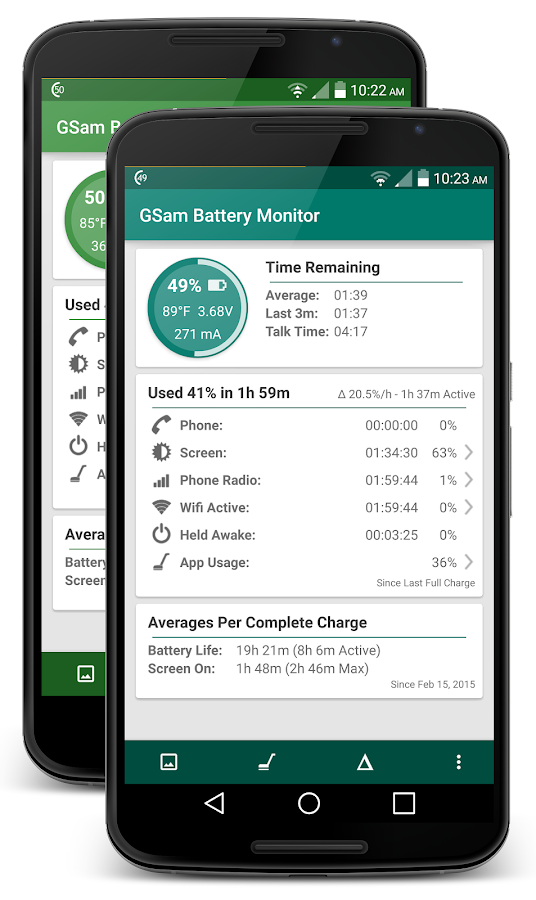
ReplyDeleteI have installed gsam battery monitor pro and at the bottom there is a info " average per complete charge" and battery life , screen on ... actualy what they represent ? Is it the time my device screen can be on ? And what is in the bracket? Please reply
ReplyDeleteThanks
( screen shot attached )
Подскажите пожалуйста, почему в моем смартфоне ASUS X008 (ZC520TL) Android 6 не отображается статистика использования аккумулятора приложениями?
ReplyDeleteGSam Battery Monitor установил платную последнюю версию, и так же ничего не показывает.
E-mail: st-da@yandex.ru
Kinda funny that this app can't tell what apps are using your battery without root yet others can. Kinda seems like you just don't want to implement it. But what do I know. I'm just going by what I see and what I see is that my other app shows just how much battery each app is using while this one claims they can't because Android N blah blah blah. Why can other developers do it, then?
ReplyDeleteThanks for sharing such a great information with us. Your Post is very unique and all information is reliable for new readers. Keep it up in future.
ReplyDeleteHP Printer Support Number | HP Printer Assistant | HP Support Assistant | HP Printer Assistant
ReplyDeleteDear Author, thanks for sharing great and quality information.My name is James Enrique. If you are facing any difficulties with HP Printer.
HP Printer Assistant Download |
HP Printer Assistant
Insect Control Company Insulation Company Company inspection Villas Water leak detection company Company Cleaning Villas Furniture Moving Company Insect Control Company Insulation Company
ReplyDeleteNice information...you blog...
ReplyDeleteHP provides the best services to its customers located in various parts of the world. To repair your printer on time you have to simply call our HP phone number +1877-301-0214 over the HP Printer Support Number to talk to our HP expert team members to get appropriate solutions.
Nice information...you blog...
HP provides the best services to its customers located in various parts of the world. To repair your printer on time you have to simply call our HP phone number +1877-301-0214 over the HP Printer Support Number to talk to our HP expert team members to get appropriate solutions.
Nice information...you blog...
HP provides the best services to its customers located in various parts of the world. To repair your printer on time you have to simply call our HP phone number +1877-301-0214 over the HP Printer Support Number to talk to our HP expert team members to get appropriate solutions.
HP Printer Customer Service Number
ReplyDeleteThis comment has been removed by the author.
ReplyDeleteWhat
ReplyDeleteGet the proper guidance from technicians who have a great knowledge about HP printers. To resolve these faults and problems, contact the HP printer support number and request assistance from the support team.
ReplyDeleteHp printer tech support
Hp printer toll free number
This comment has been removed by the author.
ReplyDeleteQuicken is one of the best accounting finance-related software, that is used by small and large businesses to manage all the money related matters. However, there are times when this software confronts issues, and one such error is 'Quicken downloading transactions not showing up.' This issue can hamper your work, if not resolved timely, so you must call Quicken Customer Service to get help. The customer care team will make sure that the error is resolved instantly and from the roots itself.
ReplyDeleteRead More:- quicken customer support phone number | quicken customer care phone number | quicken tech support number | quicken technical support number | quicken customer service number | quicken customer support number | quicken customer care number | quicken tech support | quicken technical support | quicken customer service | quicken customer support | quicken customer care
The information shared by you is really worthy. Thanks for sharing.
ReplyDeleteFor turbotax assistance visit: turbotax phone number
The information shared by you is really worthy. Thanks for sharing .Keep on sharing similar posts in the future. For Turbotax Assistance visit: turtbotax supprot
ReplyDeleteThank you for sharing this interesting article, It was quite informative and looking for more such article from your end. We do have a article on printers. If you have any issue related to printers then you can contact or visit our websites and we will be happy to help you out.
ReplyDeleteBrother printer support | Lexmark printer support
Just went through your blog.
ReplyDeleteIt's really amazing and helpful.
Looking forward to more posts like this.
keep sharing
For any assistance regarding QuickBooks contact us.
QuickBooks support number
Even though Outlook is incorporated with several user-friendly features, some of its users are unable to proceed on with the fact of How to Change Outlook Password on their own. If you are finding difficulties to change the password, you must get in touch with one of our Outlook experts to have instant help.
ReplyDeleteWonderful and good post. quickbooks support phone number for quickbooks errors. good work.
ReplyDeleteCanon printer is a popular printing product that offers quality printing. It has been intended to pump out more pages and dependable in reporting its status when it starts running low. Moreover, the printer is constructed in a user-friendly way, and most of its new individuals at the time of Canon printer wireless setup, are facing issues to proceed with the installation process.
ReplyDeleteMake a call on our toll-free QuickBooks Help at +1-805-617-3111 and get instant help to settle down your queries by our experts team in just a few seconds.
ReplyDeleteFor more information visit this link: https://www.auditannum.com/quickbooks-help/
Being a QuickBooks user if you are residing in Oregon then you are welcome to get benefitted with our QuickBooks Payroll Support Phone Number 1-833-780-0086. Dial to us, if you find yourself stuck with error code. For More Visit: http://theqbpayroll.mystrikingly.com/blog/quickbooks-payroll-support
ReplyDeleteYour Blog is amazing on this topic and you had search a lot.
ReplyDelete800 Numbers Directory is Now Offering Cheap United Airlines Flights Reservations to customers at cheap cost.
The Blog is really good and that’s why I want to give 5 out of 4 Rating to this Blog.
ReplyDeleteUnlock Flight Deals for Frontier Airlines Reservations
I read your article and it is really helpful for me.
ReplyDeleteFares Match is the right place to Match Fare for the people to book Airlines Reservations.
Fares Match
Match Fare
Hi,
ReplyDeleteDo you have an APK for your app I can use to sideload onto a reference platform?
Thanks,
Mark Scanlon
GrandPad, Inc.
mark.scanlon@grandpad.net
I read the whole post and this is related to an amazing niche. Now you can book flight from Delta Airlines Official Site easily.
ReplyDeleteI like the whole post and this is very well written. According to me Virgin Australia Reservations is ideal to make sure travel goals.
ReplyDeleteI am dam sure this content is really good because of the knowledge of author. Now you can also move your saving towards big saving by choosing the Allegiant Airlines Reservations.
ReplyDelete
ReplyDeleteThank you for sharing such useful information. I really enjoyed while reading your article and it is good to know the latest updates. You can also visit this website. Comparison of UN38.3 and IEC62133 Standards; Analysis of UN3813 Standard Test Results & Causes
battery test standard
The best thing about Yahoo Mail is that it lets you customize your email signature as per your requirements. Yes, for instance, you can add new signature with logos and pictures or you can edit them with new content as well. Learning how to change Yahoo signature is not a big deal as all you need to do is to open your Yahoo email account on browser or app, and then go to settings, where you will find an option for writing email, and then you will have to go signature option. From here, you can bring changes to your Yahoo Mail signature easily
ReplyDeleteKnow - Why is Your Yahoo Mail not Receiving Emails?
how do you change a printer from offline to online
ReplyDeletewhy is word not responding
Đặt vé máy bay tại Aivivu, tham khảo
ReplyDeleteVe may bay di My
vé máy bay từ mỹ về việt nam bao nhiêu tiền
bay từ anh về việt nam
chuyến bay từ Paris về Hà Nội
One of the most popular search engines, Google Chrome is increasingly used by many individuals. To make Google as the default search engine on Chrome, all you need to do is launch the browser first. Next, on the upper right-hand side, click on the search bar and then from the search section, select “Google” as your default search engine from the list of available options.
ReplyDeleteRelated Blog’s
How to Enable Flash in Chrome ?
How to Make Chrome Default Browser ?
How to Change Font Size in Google Chrome Address Bar ?
How to Customize Google Chrome ?
How Do I Change The Startup Page On Google Chrome ?
How to Clear Cache and Cookies on Google Chrome ?
How to Delete History on Google Chrome ?
ReplyDeleteNice Information , Thanks For The Great Content
Get started to Install, Setup, Connect, Print from your 123 hp setup printers. Easy to Download driver & Printer software from HP Envy,HP Officejet,HP Officejet Pro,HP Deskjet Printer Setup Driver Installation
For More Support
123.hp.com/Setup|123hp com/oj8049|123.hp.com/oj3830|123.hp.com/oj4650 | 123.hp.com/Setup ojpro|ojpro6968|
ojpro6970|123.hp.com/ojpro6968|123.hp.com/ojpro6970|123.hp.com/ojpro6978|123.hp.com/ojpro8600|123.hp.com/ojpro8710|123.hp.com/ojpro8720
I am happy to be here and this wonderful blog. I have found here lots of important information for my knowledge I need. Thanks for sharing this amazing post. If you have any problems related to Roadrunner Email login Problems please contact our team for instant help.
ReplyDeleteelectronics blog here, check it now!
ReplyDeleteWe Level Up meth treatment tx offers top-tier addiction treatment detox using evidence-based therapy along with secondary dual diagnosis programs.
ReplyDeleteLevel Up 12 step program alcohol Treatment Center in West Palm Beach is located in stunning South Florida. Our clients who are looking for the best alcohol or drug treatment to overcome their fixation for the last time come from the United States, Canada, and even the world to receive our treatment plan.
ReplyDeleteWorld-class We Level Up dual diagnosis treatment centers in cali Addiction Treatment Center providing Dual-Diagnosis Recovery Programs.
ReplyDeleteHey, you have shared a very nice blog. I found many points that can be very useful for most of us. I also have some topics related to Accounting Software Singapore
ReplyDeleteCarpet cleaning is an important process that should not be ignored. Not only does it make your home look and smell better, it can also improve your health. If you are looking for a professional carpet cleaning company in the Dandenong area, be sure to contact us!
ReplyDeleteIs the battery of your car dead because of cold and you can't start your car? Then you should call a battery boost service. Because a battery boost service will help you to start a vehicle with your discharged or dead battery.
ReplyDeleteWow, your post is really very useful thanks for sharing. It's really informative. keep sharing more with us about Alabama Ptsd Counseling For Veteran .
ReplyDeleteI think this is one of the most significant pieces of information about TMS For Depression Treatment Brisbane for me. And I'm glad to read your post. Thank you for sharing!
ReplyDeleteFrequently Asked Questions - Gsam Battery Monitor >>>>> Download Now
ReplyDelete>>>>> Download Full
Frequently Asked Questions - Gsam Battery Monitor >>>>> Download LINK
>>>>> Download Now
Frequently Asked Questions - Gsam Battery Monitor >>>>> Download Full
>>>>> Download LINK U6
thnks
ReplyDeleteTTN Roadside Assistance has a few advantages which can be unparallel to another agency and their prices also are reasonable.
ReplyDeleteThanks for answering those questions. So helpful! Maytag repair Calgary
ReplyDeleteInformation appreciated! Thank you so much for educating us.
ReplyDeleteThanks for the great! Love it https://applicationfiling.com/
ReplyDeleteThanks you answered this question very well, almost as easy as getting my dead battery in Langford assisted last week.
ReplyDeleteSummertime Saga Benzeri Oyunlar
ReplyDeleteAmong Us Benzeri Oyunlar
Valorant Benzeri Oyunlar
Rust Benzeri Oyunlar
Fortnite Benzeri Oyunlar
İK3QZ
Android itself will also stop background tasks automatically when it needs resources. hence why task killers are not a good idea for Charlotte Drywall Contractors - Android already does this.
ReplyDeleteYou have done a great job here. Thanks for sharing your journey as week challenges with us. Anyway, if you're seeking for Pest control, I can recommend you this. | commercial pest control
ReplyDeleteThe passage provides detailed information about the GSam Battery Monitor app, its compatibility with different Android versions, permissions, and potential issues users might encounter. It also offers solutions and workarounds for those issues. panel fence
ReplyDeleteDevice manufacturers can email the author at the email address that is provided in the text. They should include the specific device that is not correctly reporting telephony support in their email.
ReplyDeleteI'm glad to see this informative post here. Great share! tile installation
ReplyDeleteThanks for sharing this great content. masonry contractor
ReplyDeleteIt's nice seeing this informative post here. solar panel cleaning
ReplyDeleteThanks for sharing your thoughts! I couldn't agree more. drywall repair Logan Utah
ReplyDeleteThe guide offers detailed explanations and practical solutions for users experiencing issues with GSam Battery Monitor, ensuring optimal functionality and accurate battery usage tracking. https://www.poolcleaningservicesatlanta.com/
ReplyDeleteThat's helpful information to know about GSam Battery Monitor and its compatibility with Android KitKat!
ReplyDeleteI also have the same question, glad to know this info.
ReplyDeleteGSam Battery Monitor strives to provide accurate and detailed battery usage information, catering to both non-root and rooted users across different Android versions and devices. https://www.remarkbuilders.com/
ReplyDeleteYou're mistaken. GSam Battery Monitor actually faced limitations on Android KitKat (4.4) due to changes Google made to how apps access battery statistics.
ReplyDeleteHow does Gsam define screen brightness?
ReplyDeleteRegards,
www.drywallgreensboro.com
GSam Battery Monitor has undergone updates to ensure compatibility with Android KitKat (4.4) for non-root devices. However, users with rooted devices can access additional statistics. https://www.remarkbuilders.com/
ReplyDeleteThanks for sharing this blog here, very informative one. concrete driveway
ReplyDeleteGlad to visit this site, very interesting one. gt performance scrubs
ReplyDelete